Sales & POS

Your POS already knows what you sold

Connect it once. Rinvy uses your sales to keep stock current between counts, show what you should have used, and give you food cost on real sales.

POS sales data: Standard and Pro plans

rinvy.app/reports?type=sales
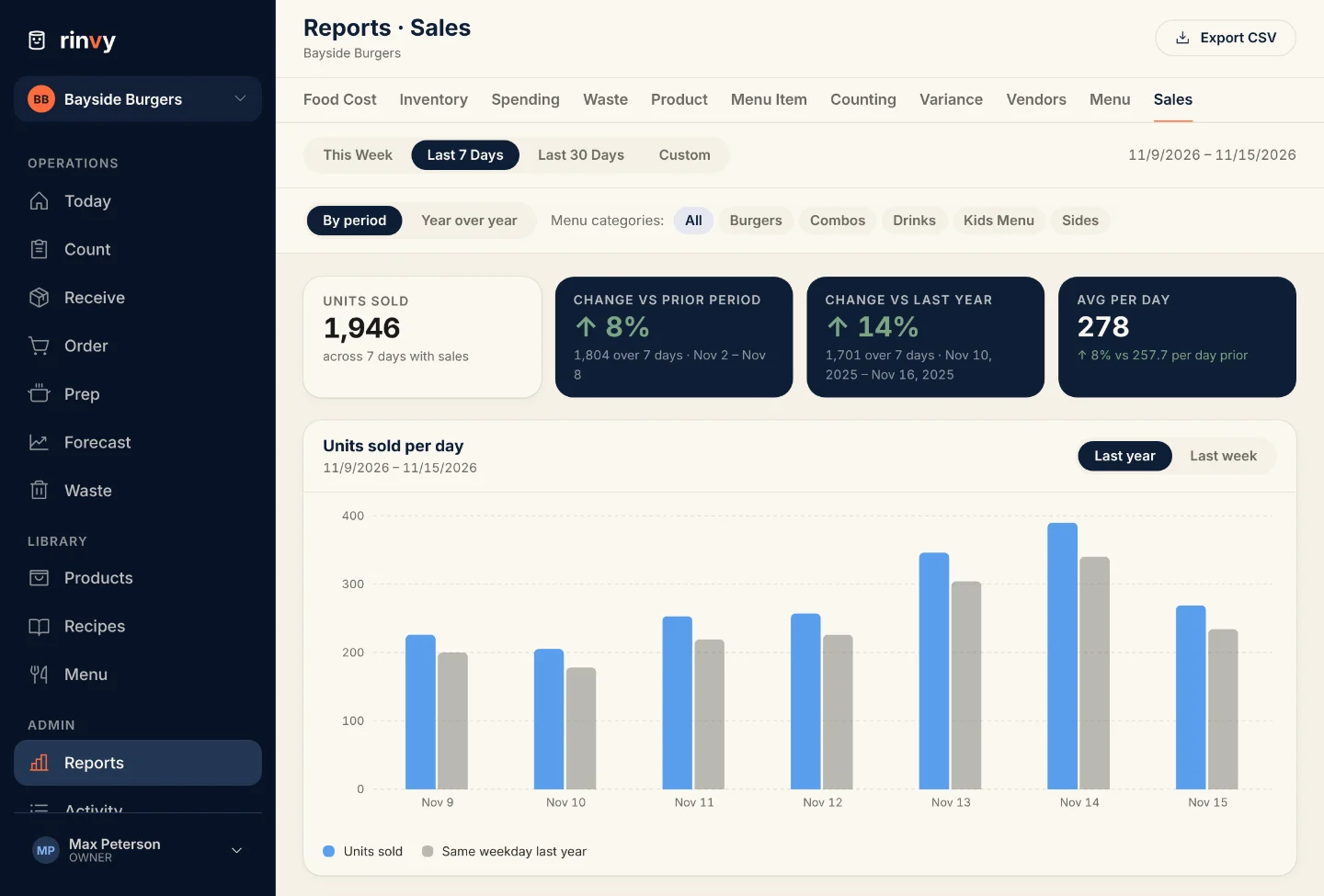
Rinvy Sales report: units sold per day for the last 7 days against the same weekdays last year, with tiles for units sold, change against the prior period, change against last year and average per day

Get your sales in without typing them

Connect Toast once and Rinvy pulls yesterday’s item sales once a day, at the hour you pick. On any other POS, upload its item sales CSV, have it email its daily report to your kitchen’s own sales address, or send sales from Zapier, Make or a Google Sheet.

  • Toast auto-sync once a day, and a missed day catches up on the next run
  • Any other POS: CSV upload, an emailed report (CSV or PDF) or the Sales API
  • Every feed lands in one place, ready for stock and costing
Sales Feeds
Where your sales come from
Toast
Daily sync at 6:00 AM
Synced through yesterday
Emailed report
sales-3f9a…@rinvy.app
CSV or PDF
CSV upload
Item sales export
Any POS
Sales API
POST /api/v1/sales
Zapier, Make, Sheets
Yesterday's sales142 lines matched

Every feed lands in the same place, matched to your menu items and ready for stock, variance and food cost.

Map each POS item once

Your POS says “MARG PIZZA”. Your menu says Margherita Pizza. Rinvy suggests the closest menu item, you confirm it once, and every later upload matches it on its own. Gift cards and other items you never track go on an Always skip list.

  • Exact names match on their own, the rest wait for you in Pending Review
  • Suggestions are only hints. Nothing counts until you confirm it
  • Learned mappings and skip rules you can change at any time
  • Mapped the wrong item? Change the line and Rinvy recalculates those days
Sales Review
2 matched1 unmatched1 skipped
Beef Taco Plate→ Beef Taco Plate
CHX SAND→ Chicken Sandwich
MARG PIZZAUnmatched
Likely: Margherita Pizza
ConfirmAlways skip
Gift CardAlways skipped

Confirm a match once. Next time MARG PIZZA shows up, it matches on its own.

Stock that follows your sales between counts

Count on Monday, and by Thursday the numbers are stale. With sales flowing in, each sale takes what its recipe uses from the products you count. Sell 40 burgers at 6 oz of beef each and 15 lb of ground beef comes off. The figure shows est. and the age of the last count until your team counts again.

  • Inventory, the Order List and Home show stock after yesterday’s sales
  • Marked est. with “counted 3 d ago”, so nobody mistakes it for a count
  • The count sheet never shows the estimate. Your team counts the shelf
  • The next count replaces the estimate
Inventory
Yesterday: 40 burgers sold6 oz ground beef each, so 15 lb comes off stock
Ground Beef
22.5 lb · est.
counted 2 d ago
Cheddar Cheese
8.25 lb · est.
counted 2 d ago
Burger Buns
64 each · est.
counted 2 d ago
Fryer Oil
3 jug
counted today

The count sheet never shows the estimate. Your team counts the shelf, and the count replaces it.

Products that track themselves

Bottled soda, canned beer and packaged snacks sell one for one. Mark them auto-tracked, enter a starting count, and each day’s sales come off their stock. Combos that include the product count too. They stay off the nightly count sheet, and you recount them when you choose.

  • One starting count, then sales take it down day by day
  • Deliveries and waste move it like any other product
  • Uploading the same days again never takes sales off twice
Coca-Cola 20 oz
Auto-trackedCase of 24 · each
Stock by day
Mon · Starting count54
Tue · 18 sold−18 36
Wed · 15 sold + 3 burger combos−18 18

Bottled drinks and packaged snacks drop one for one with each sale. Recount them now and then to keep the shelf honest.

What you should have used against what you did

The Variance report multiplies what you sold by your recipes to get what you should have used. Then it sets that against what really left your stock between two counts. The products with the biggest dollar gap go to the top, so you know where to look for waste, heavy portions or a missed receipt.

  • Should have used: units sold × recipe amount
  • Used: stock at the start, plus deliveries, minus stock at the end
  • Every gap in units and in dollars, biggest first
Variance · Last 7 Days
Should have usedUsed
Chicken Breast+9 lb +$31
Heavy Cream+2 qt +$12
Romaine−1 case −$4

Should have used = units sold × recipe. Used = what left your stock between counts. The gap is waste, portions or a missed receipt.

Food cost on real sales

The Food Cost report takes two counts, your purchases and your net sales, and gives you the food cost % for your P&L. Beside it sits what your recipes say it should have been, and the gap between them. The Sales report shows units sold per day against last week and the same weekdays last year.

  • Actual food cost between two counts, beside theoretical
  • Units sold, change against the prior period and against last year
  • Average per day, so a short week still compares fairly
  • On the Pro plan, the same sales history feeds AI demand forecasting
Sales · Last 7 Days
1,284
Units sold
+6%
vs prior period
+11%
vs last year
183
Avg per day
MonTueWedThuFriSatSun

Food cost between two counts
Actual30.0%
Theoretical27.5%
Unexplained+2.5%

Build on your own numbers

Owners create automation API keys in Kitchen Settings and tick what each key can do. Send sales from a tool your POS already talks to, create a draft prep list from a Google Sheet, or read food cost, sales and waste into a spreadsheet or a BI tool.

  • Send sales: the same matching as a CSV upload
  • Create prep lists: a draft a manager approves before anyone preps
  • Read reports: the same numbers the Reports page shows, read-only
Automation API Keys
Zapier
rk_live_••••••••
Send sales
Prep sheet
rk_live_••••••••
Create prep lists
KPI dashboard
rk_live_••••••••
Read reports
GET /api/v1/reports/sales?startDate=…
Authorization: Bearer rk_live_••••

Each key holds only what you ticked. A reports key can read your numbers but never change anything.

Ready to simplify your kitchen operations?

Set up in 30 minutes. Try a demo kitchen after you sign up. No contracts, cancel anytime.